
The broker CRM your desks will actually want to work in
Lead management, money desks, compliance, telephony and team tools in one back office — connected live to your client portal and trading terminal.
Built around how broker desks work
Conversion, retention, compliance and management each get the screens they need.
Lead workspace & priority queue
A full-page workspace for every lead, plus a priority work queue so agents always know who to call next.
Labels & auto-labelling
Free-form labels with automatic tagging rules and label history, so your pipeline is organised the way you run it.
Money desks
FTD accounts, a retention FTD queue, conversion-desk deposits, trades oversight and a full withdrawals command centre.
KYC & support desks
Verification queues for conversion and retention, a support centre, operator tickets and live chat with clients, including attachments.
Click-to-call VoIP
Dial from the lead card, schedule calls with reminders, log call status and sync call records automatically.
Telegram desk alerts
Multi-bot Telegram routing sends deposits, registrations and status changes to the right team channel, with scheduled digests.
Roles, lead scoping & IP allowlist
One login for admins and agents, page-level permissions, lead scoping, agent IP guard and a CRM IP allowlist.
Anti-fraud on intake
Every incoming lead, from the API or your own forms, is screened by an anti-fraud engine before it reaches your desks.
AI assistant built in
An AI agent inside the CRM helps your team navigate instantly: find any page, lead or feature and get answers on how things work.
Human support on Telegram
Real people from our team on Telegram for any request, from quick questions to new features.
Your brand colours
Re-theme the CRM with your own colour palette so your team works inside your brand.
Broker website included
We build your brokerage's marketing website too, included in the price at no extra cost.
Learn more →Live KPIs
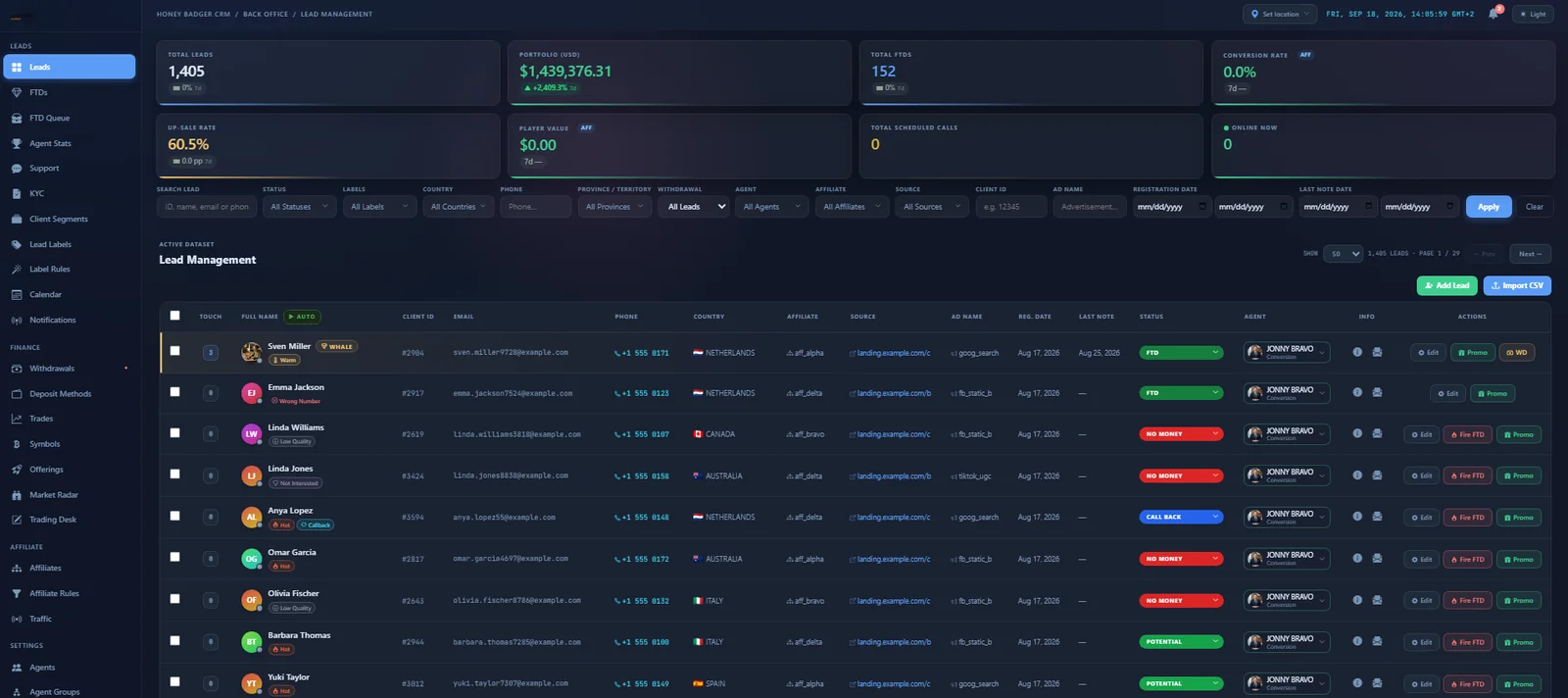
Total leads, FTDs, conversion, up-sale rate and scheduled calls at the top of every desk.
A CRM that feels like a modern app
An AI assistant built into the lead table, command-palette search, right-click menus and instant previews. Agents move through hundreds of leads without waiting on page loads.
- Built-in AI agent for easy navigation and instant answers
- Cmd-K palette to jump to any lead, page or action
- Light and dark appearance with your colour palette
Run the floor, not spreadsheets
Agent statistics, a wall-screen floor HUD, team chat, a shared calendar and live presence show managers exactly what is happening on the floor right now.
- Floor HUD for wall screens with the live activity feed
- Agent daily stats and performance views
- Team chat, notifications and online presence
The CRM, live
Real screen recordings from HoneyBadger CRM (demo data).
Lead management
Live KPIs, powerful filters and the lead table your desks work from.
Client card
Status, assignment, personal details and attribution for every client in one place.
Money desks
Depositor accounts and the FTD queue with balances, deposits and P&L at a glance.
KYC & client segments
Verification queue, then smart segments to group and assign clients.
Push broadcasts
Send push notifications to your clients' phones and browsers from the CRM.
Withdrawals & deposit methods
Process withdrawals and control exactly which deposit methods clients see.
Trades & symbols
Oversee trading activity and manage the tradable asset list.
Economic calendar
Publish market events your clients see in their portal.
HoneyBadger CRM questions
What is a forex CRM?
A forex CRM is customer relationship management software built for brokerages. Beyond contact management it handles lead distribution, conversion and retention desks, deposits and FTD tracking, KYC, withdrawals and the link to the trading platform.
Does HoneyBadger CRM include telephony?
Yes. Click-to-call VoIP is built in, with support for multiple telephony providers, call scheduling and reminders, call records sync and softphone contact lookup.
Can I import my existing leads?
Yes. Leads can be imported from CSV, and new leads arrive through the partner API from landing pages and affiliates.
What support is included?
An AI agent built into the CRM for easy navigation, plus human support from our team on Telegram for any request.
How is access controlled?
The CRM sits behind an IP allowlist. Admins and agents share one login, with page-level permissions, lead scoping, agent IP checks and an actor-aware audit log.
Does it work for crypto brokers?
Yes. The platform supports crypto alongside stocks, commodities, indices and forex, and clients hold crypto in their wallets.
Part of one connected platform
See HoneyBadger CRM with your own desk structure
We will walk you through the CRM, WebTrader and client portal live, discuss pricing for your setup, and plan your launch.